¶ Cashboxes
Open in CRM: /rentokar/cashbox
Cashbox (/rentokar/cashbox) shows the money of a Rent-a-Car company: cash at the desk, bank accounts, the account deposits are held on.
It is the same screen as in a taxi company — the same component, the same data, the same rules. What differs is the route, the surrounding menu, and which buttons your role is allowed to see. Rental income, deposits and fines all land on cashboxes booked here.
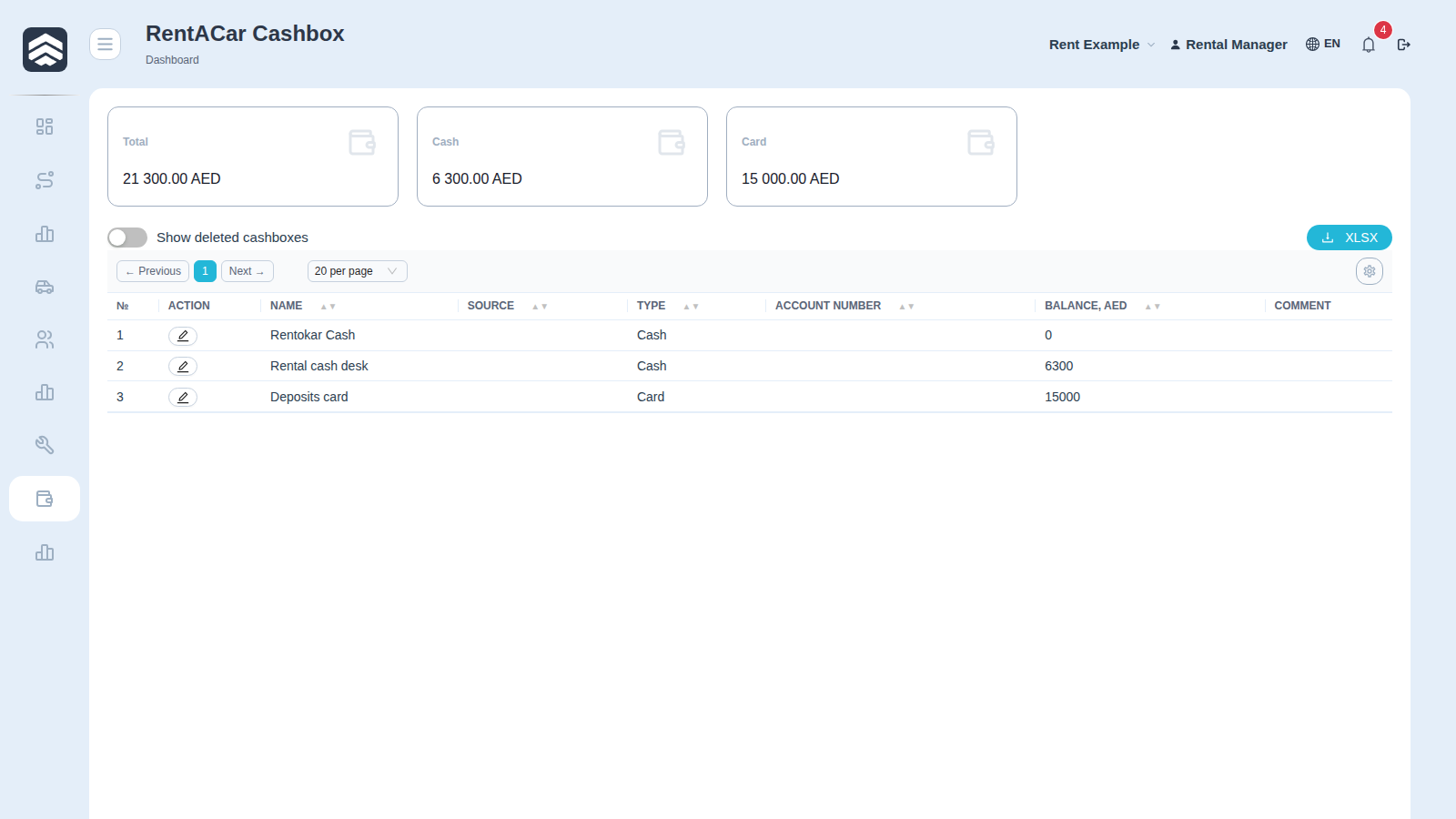
¶ Main screen
Above the table — Total, Cash and Card. Each widget is hidden when its total is zero, so a freshly created company shows none of them.
| Column | Description |
|---|---|
| № | Row number |
| Action | Buttons available for the row |
| Name | Cashbox name |
| Source | Integration that owns the cashbox. Empty for cashboxes created by hand |
| Type | Cash, Card or Acquiring |
| Account Number | Account or card number |
| Balance, AED | Current balance |
| Comment | Free-text note |
The Show deleted cashboxes toggle brings back rows that were hidden rather than destroyed. XLSX exports the visible columns in their current order; the gear on the right is where that order is set.
¶ Types
Cash for physical money, Card for a bank account, Acquiring for a payment terminal. Deposits are normally held on a separate Card cashbox — keeping them apart from operating money is what makes "how much of the balance is not ours" answerable at a glance.
¶ Creating a cashbox
Add opens a form: Name, Type, Account Number, Start Balance, Comment. The start balance is the amount already in the cashbox when the company started using the system; it is added to the balance and is not booked as a transaction.
¶ Operations
The first button in a row offers Cashbox Income and Transfer of funds. A transfer is one operation with two sides — the source loses, the target gains — which is why it is the right tool for moving money between your own accounts.
¶ Why your screen may have fewer buttons
The screenshot above is taken as a rental manager, and that role has no Add, no delete and no money operations — only editing. This is not a bug and not a different page: the buttons are gated by rights.
| Action | Required right |
|---|---|
| Open the section | CASHBOXES_READ |
| Add button | CASHBOXES_ADD |
| Edit (pencil) | CASHBOXES_CHANGE |
| Delete (bin) | CASHBOXES_DELETE |
| Income and transfer | TRANSACTIONS_ADD |
A cashbox owned by an integration cannot be deleted or renamed at all, whatever your rights.