¶ Integration
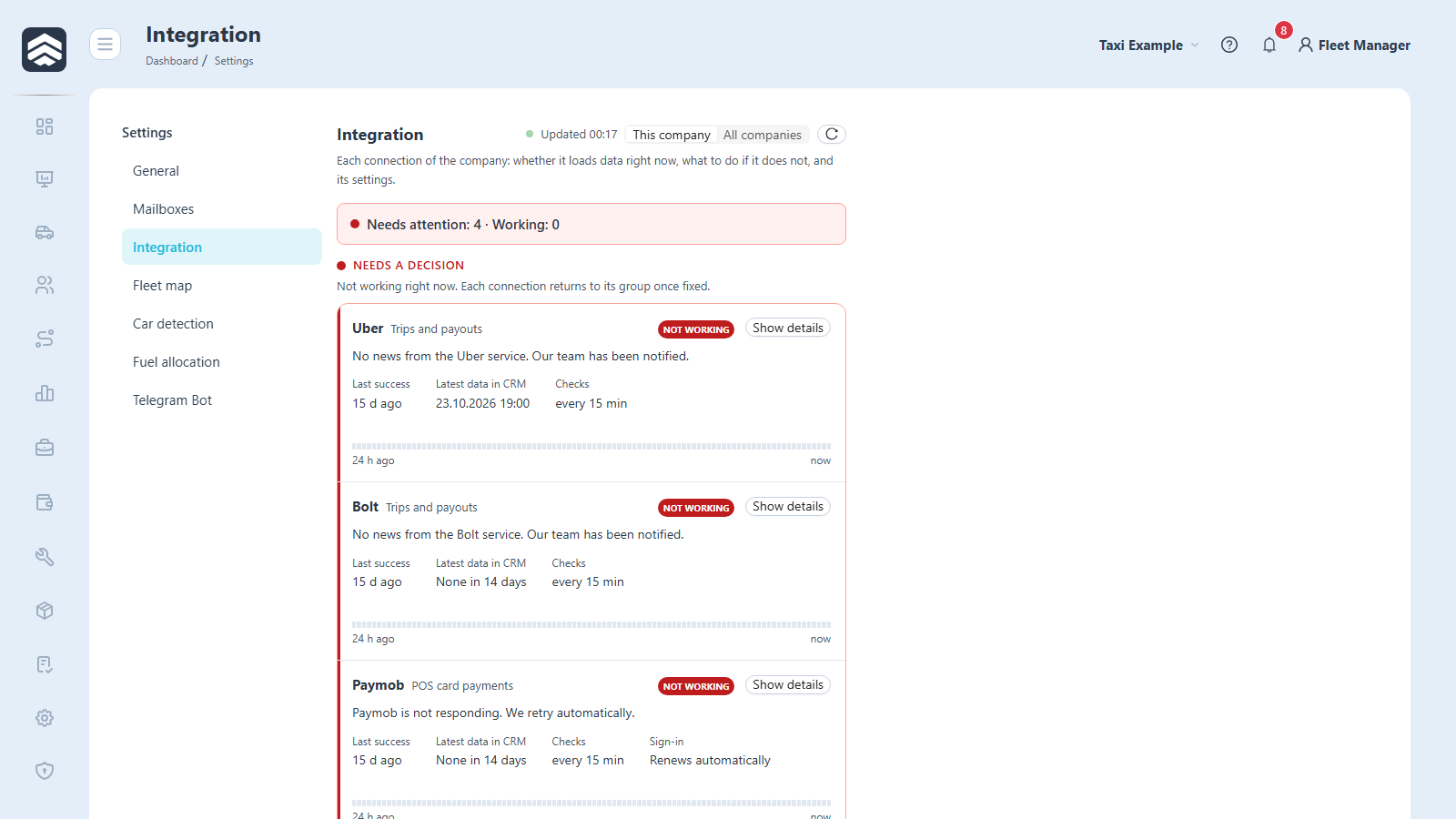
Open in CRM: /settings/integration
Integration is the single place where the company is connected to everything outside the CRM: ride aggregators, POS payment providers, toll gates, GPS trackers, web cabinets of fuel and charging providers, and the services the CRM itself uses — messengers, AI and maps. Every connection is one row. The row says whether the connection works right now and what to do if it does not; Show details opens its settings and its latest runs.
Open the page when trips, POS payments, fuel receipts or messages to drivers look missing — the answer is usually here — and whenever you connect something new.
Two former pages now live here. Integration health (the states, the bar of runs, Reconnect and Connect) and External Services (the ENOC, Legend, ChargeGo and RTA cabinets) were merged into this one; old links to /settings/integration-health and /settings/external open this page.
¶ How the page is laid out
The rows are grouped by what they connect:
| Group | Rows |
|---|---|
| GPS | One row, GPS tracker — the tracker chosen for the company: Cabman, IotMobility, Sharyo or No GPS tracker |
| Aggregators | Uber, Yandex / Yango, Bolt, Careem, Zed |
| Other | POS payments and tolls — Paymob, Geidea, DARB (Abu Dhabi toll gates); provider cabinets — ENOC (fuel receipts), Legend and ChargeGo (electric charging), RTA (Salik passages and traffic fines); services the CRM uses itself — WhatsApp, Telegram, OpenAI, Maps |
Above the groups, a red Needs a decision block collects every row that is Needs sign-in or Not working, whatever group it comes from — that is where to look first. A row leaves the block and returns to its group as soon as it recovers: the page refreshes every minute and at once when a state changes. Intermittent rows stay in their group: a hiccup heals itself and needs no one.
The line at the top answers the main question at once: how many connections need attention and how many work. It counts Intermittent rows too, so it can be larger than the Needs a decision block. Problems are marked with a coloured stripe on the left of the row.
Two rows stand for two connections each, and show both inside: RTA (Salik passages and traffic fines — one login, two streams that can break apart) and Maps (MapTiler for tiles, ORS for routes). The badge next to the name is the worse of the two, and the same state decides whether the row goes up into Needs a decision; each stream below has its own badge.
Careem has no state: the aggregator has been retired and there is nothing left to watch — only the old fields. MapTiler and ORS are not watched for a company on Google Maps that has no key for them. OpenAI stays Not set up until the company has its own API token: the assistant otherwise runs on a key shared by the whole platform, and neither its outages nor its bill are this company's.
A carlift company sees only Other — messengers, AI and maps: it has no aggregators, trackers or cabinets.
¶ What a row shows
- Last success — how long ago data was last loaded successfully; hover for the exact time.
- Latest data in CRM — the newest row this connection actually put into the CRM over the last 14 days: a trip, a POS payment, a toll passage, a fuel or charging receipt, a fine. It is measured independently of the connection, so it stays honest even if the service itself went silent. Shared where the data is shared: Geidea and Paymob both bring POS payments, and Legend and ChargeGo are indistinguishable once imported — both arrive as electric charging, so only the run report says which cabinet actually worked. For GPS trackers and for the CRM's own services there is nothing to measure, and the field stays None in 14 days — that is normal, judge them by Last success.
- Checks — how often the connection is checked. Services and aggregators are polled on their own rhythm; the provider cabinets run once a night or every few hours, and the CRM's own services report every three hours at the rarest.
- Sign-in — whether the CRM renews the sign-in by itself (Renews automatically) or it is supplied from outside (Renewed manually). Hover to see until when the current access is valid. The field appears only where the connection reports a sign-in it manages.
- The bar — the last 24 hours in 15-minute slots: green — loaded, red — failed, yellow — some checks failed, grey — no check. A taller bar means more rows loaded. Hover a bar for details.
A night with no trips is normal: a check can succeed and load nothing. Worry when Last success grows or the bar turns red, not when Latest data in CRM is a few hours old at night.
Show details opens the row:
- Settings — the fields of this connection and its own Save button (see below);
- Recent runs — the last error text and the latest checks with their result and number of rows, for each stream of the row.
A connection that is not configured offers Set up instead — it opens the same settings.
¶ Settings and saving
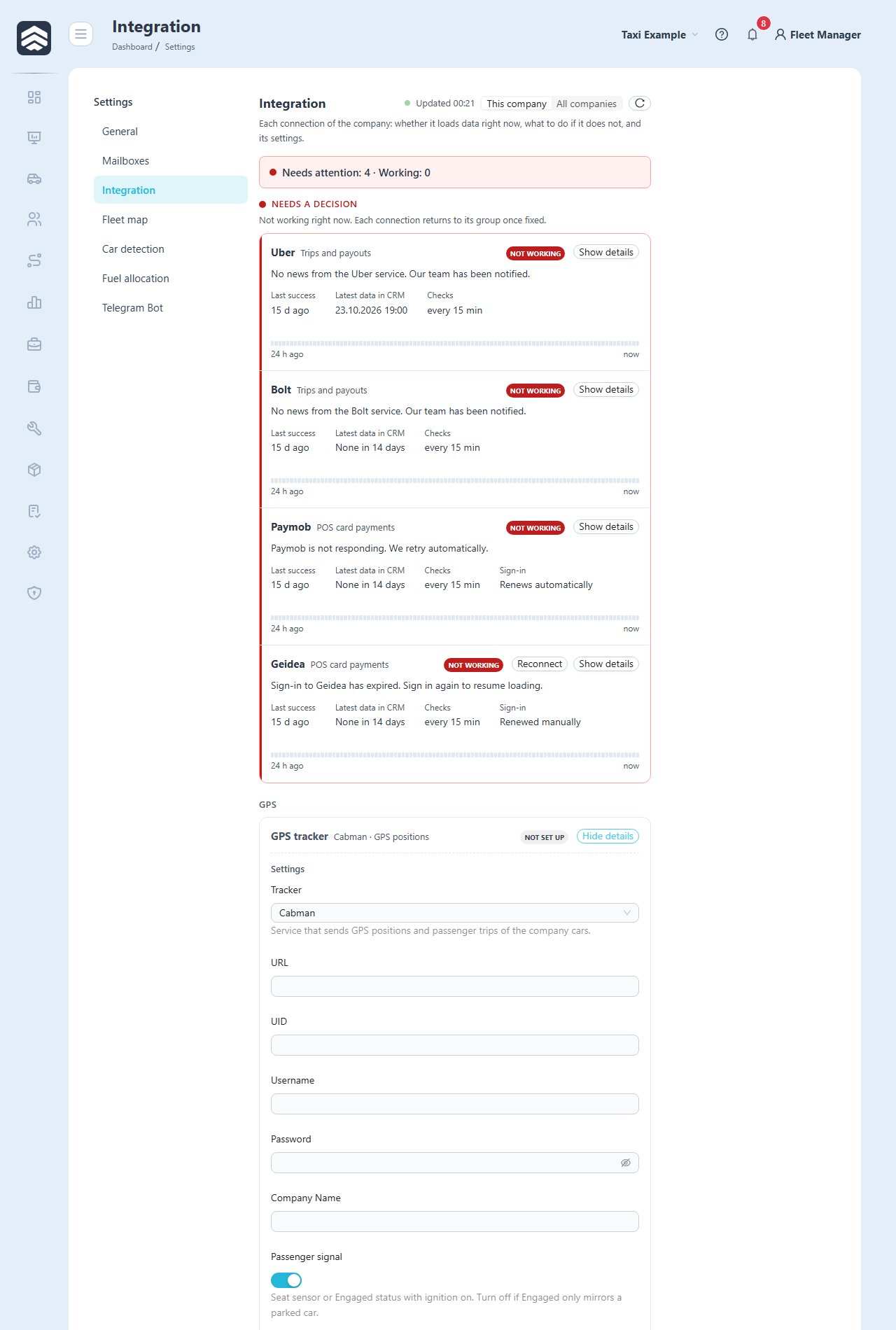
Every row is saved on its own: change the fields, press Save under them. Only that connection is sent — a half-typed key in another row stays where it is, unsaved, and is not sent by accident. Unsaved changes next to the button reminds you that the fields differ from what is stored. The state of the row is the state of what is saved: picking another tracker in the form does not move the row or change its badge until you press Save.
Cabinet passwords (ENOC, Legend, ChargeGo, RTA) never come back from the server: a saved one shows as Saved. Leave empty to keep it. — type a new one only when you want to replace it. The other secrets — API keys, client secrets, bot tokens — are loaded back into their fields, hidden behind dots, and saved again as they are.
If the cabinet settings failed to load (a network glitch, or no rights), Save of the four cabinet rows is switched off rather than overwrite your logins with blanks — reload the page. The other rows save as usual. If the states failed to load, the page says so at the top and still shows every row with its settings.
¶ States
| State | What it means | What to do |
|---|---|---|
| Needs sign-in | The provider stopped accepting our sign-in (expired or revoked) | Press Reconnect or Connect if the row offers it; otherwise sign in at the provider and re-enter the credentials in the row's settings. Until then no new data arrives |
| Out of quota | The same state, different cause: the paid quota or the credit balance of the service is spent | Top the account up at the provider. It will not heal by itself |
| Not working | No successful load for a long time, or the service stopped reporting | Read the message under the name; if it says that our team has been notified, we are on it |
| Intermittent | The last check failed, but data arrived recently — or runs keep succeeding while no new data arrives | Usually nothing: checks repeat automatically. See "Runs fine, but no new data" below |
| Working | The last check succeeded | — |
| No data yet | The connection is set up, but no check has reported yet | Wait for the first check |
| Not set up | The connection is not configured for this company | Set up opens its settings |
A single failed check never turns a connection red: the state changes to Not working, Needs sign-in or Out of quota only after two failures in a row.
The silence we tolerate depends on the rhythm. A connection polled every few minutes is called broken within an hour or so; the nightly cabinets get the whole night plus a working morning, so one missed run raises the alarm at a sensible hour instead of at four in the morning.
¶ Where a state comes from
Three independent sources feed the same picture, and knowing which one answered explains how fast a problem shows up:
- A run report. The service (or the nightly automation) says after every pass: succeeded or failed, why, how many rows. The fastest and most precise source.
- The outcome of real calls. For the CRM's own services there is nobody polling them, so the code that goes to the provider anyway reports what came back — a route built for the carlift board, a map drawn into a notification, an answer from the assistant. This is why an exhausted quota shows up the moment a real request hit the limit.
- A check of our own, every three hours, and only while a service was silent. During the day the real calls hold the status; at night the check answers "are we still connected at all". It skips a service that reported anything in the last hour and a half, and never touches one that is not set up.
WhatsApp is the exception: its state comes only from the check. Messages are sent by a separate service, and the CRM does not see the outcome of a send. A failed send therefore shows up not instantly but at the next check (or when you press Check WhatsApp connection in its settings).
¶ Runs fine, but no new data
A run can succeed and bring nothing: the cabinet handed over an empty file. From the outside that is exactly what a silently broken import looks like — and it is how the Salik import stayed broken for two weeks in August.
So for the streams where an empty week is abnormal — Uber, Bolt, Yango, ENOC and Salik — a long run of successful-but-empty passes turns the row Intermittent with the message Runs fine, but no new data since …. Everywhere else the rule is off on purpose, for two different reasons: DARB, charging and traffic fines see a few events a week, and the signal would cry wolf every week; Zed is frozen, so an empty stream is one of its normal states.
⚠️ This state does not heal by itself. A connection nobody uses any more, but whose cabinet is still switched on, will stay Intermittent for good, and there is nothing on the page to acknowledge or dismiss it. The cure is to switch the connection off in its settings.
¶ GPS
One row, GPS tracker — positions and passenger trips of the company cars. Next to the name it says which tracker is saved.
A company has one tracker or none. Pick it in Tracker, and the settings show the fields of that tracker only:
| Tracker | Fields |
|---|---|
| No GPS tracker | None — the company's cars are not polled for positions at all, and the row has no state |
| Cabman | Address, UID, username, password, company name in the tracker, and whether the passenger signal is trusted. Without the address and UID the tracker counts as not set up and is not polled |
| IotMobility | API key, Group ID, TWX user and the client organisation name as it is set up in IotMobility. API key and Group ID are required |
| Sharyo | Service address, username, password and two switches: trust the seat sensor, and skip plates unknown to the CRM. Address and username are required |
Switching trackers does not erase the fields of the previous one — switch back and they are still there. Two trackers at once are not supported: the CRM would mix the positions of one car coming from two sources.
¶ Aggregators
| Row | What it is for | What you fill in |
|---|---|---|
| Uber | Trips and payouts | Client ID, Secret ID, Company ID — picked with Load organizations, see below — and OAuth scopes (the Reports API needs solutions.suppliers.reports) |
| Yandex / Yango | Trips and payouts | Company ID, API key; optionally collecting order GPS tracks |
| Bolt | Trips and payouts | Client ID, Client Secret, Company ID |
| Careem | — | Company ID, Token Service Secret. The aggregator no longer operates; the fields are kept so old records stay readable |
| Zed | Trips | Login and password; the token is filled by the CRM and shown read-only |
Uber, Yandex / Yango, Bolt, Careem and Zed also carry a Show in reports switch: it hides the aggregator's columns in reports without disconnecting it.
¶ Uber Company ID
Company ID is the ID of your organization in Uber, and every request for trips, drivers and cars carries it. There is no need to dig it out of Uber: fill in Client ID and Secret ID and press Load organizations — the CRM signs into Uber with them and lists the organizations your app can see, by name. One organization is filled in by itself (an ID you already typed is never replaced); with several, pick yours from the list — a child organization is marked with ↳. Press Save afterwards.
If Uber refuses, the message says why: the Client ID or Secret ID is wrong, or the app has no access to organizations — then ask Uber to grant vehicle_suppliers.organizations.read, or paste the ID by hand: the field still takes any text.
¶ Other
| Row | What it is for | What you fill in |
|---|---|---|
| Paymob | POS card payments | Address, API key, first and regular import limits |
| Geidea | POS card payments | Store IDs of all points of sale, comma-separated, and the depth of the first import |
| DARB | Abu Dhabi toll passages | The login of the DARB company cabinet (empty turns the integration off) and the date passages are loaded from |
| ENOC | Fuel receipts | Switch Enabled, cabinet user and password, how many days back to read, the cash box the receipts are booked to, and the mailbox the one-time password is taken from |
| Legend | Electric charging | Enabled, cabinet user and password, the charging accounts — chosen from a named list with Load accounts, not typed as raw IDs — and the cash box the sessions are booked to |
| ChargeGo | Electric charging | The same fields, the same Load accounts picker and its own cash box |
| RTA | Salik passages and traffic fines | Enabled, cabinet user and password, fines limit, Salik account number, the prefix of the Salik report file, the Salik cash box and the OTP mailbox |
| WhatsApp Bot | Messages to drivers | Instance ID and token of the channel. Below them — the driver notification settings: a fallback manager phone, the daily summary and the local time it is sent, illegal-trip notifications and their delay |
| Telegram Bot | Bot messages | Bot ID |
| OpenAI | AI answers of the assistant | API token |
| Maps | Maps, geocoding and routes | The provider: either MapLibre + MapTiler + ORS (a MapTiler key, an ORS key and, optionally, the address of your own ORS) or Google Maps (one API key) |
Check WhatsApp connection in the WhatsApp settings asks the provider right now whether the channel is still signed in, and prints the answer. The text is diagnostic and stays in English: by its first words we tell a provider problem from a network problem.
Who loads the cabinets. ENOC, Legend and ChargeGo are loaded by a dedicated read-only service outside the CRM: it keeps the cabinet session and pulls the rows, and it is connected with the Connect button on the row (see below). RTA — Salik and traffic fines — is still worked by our nightly automation: it signs into the web cabinet as a person would, downloads the report and imports it. Whether the nightly automation runs at all, and at what time, is not set here — we set it for the company. While it is off, the cabinet streams honestly show Not set up instead of pretending to be silent.
¶ Cash box of a cabinet
Every cabinet has a Cash box field: the cash box of your company that the imported receipts, sessions or passages are written off from (for RTA it is the Salik cash box; fines go their own way). The field appears once the cabinet is switched on — pick it before you press Save: without it the import has nowhere to book the rows and refuses them.
¶ Choosing the charging account (Legend, ChargeGo)
Allowed Account IDs is the account on the charging platform whose sessions are imported — a long identifier you would otherwise have to find and type. Instead, fill in the cabinet user and password and press Load accounts: the CRM signs into the cabinet and lists the accounts by name. Pick your own and press Save.
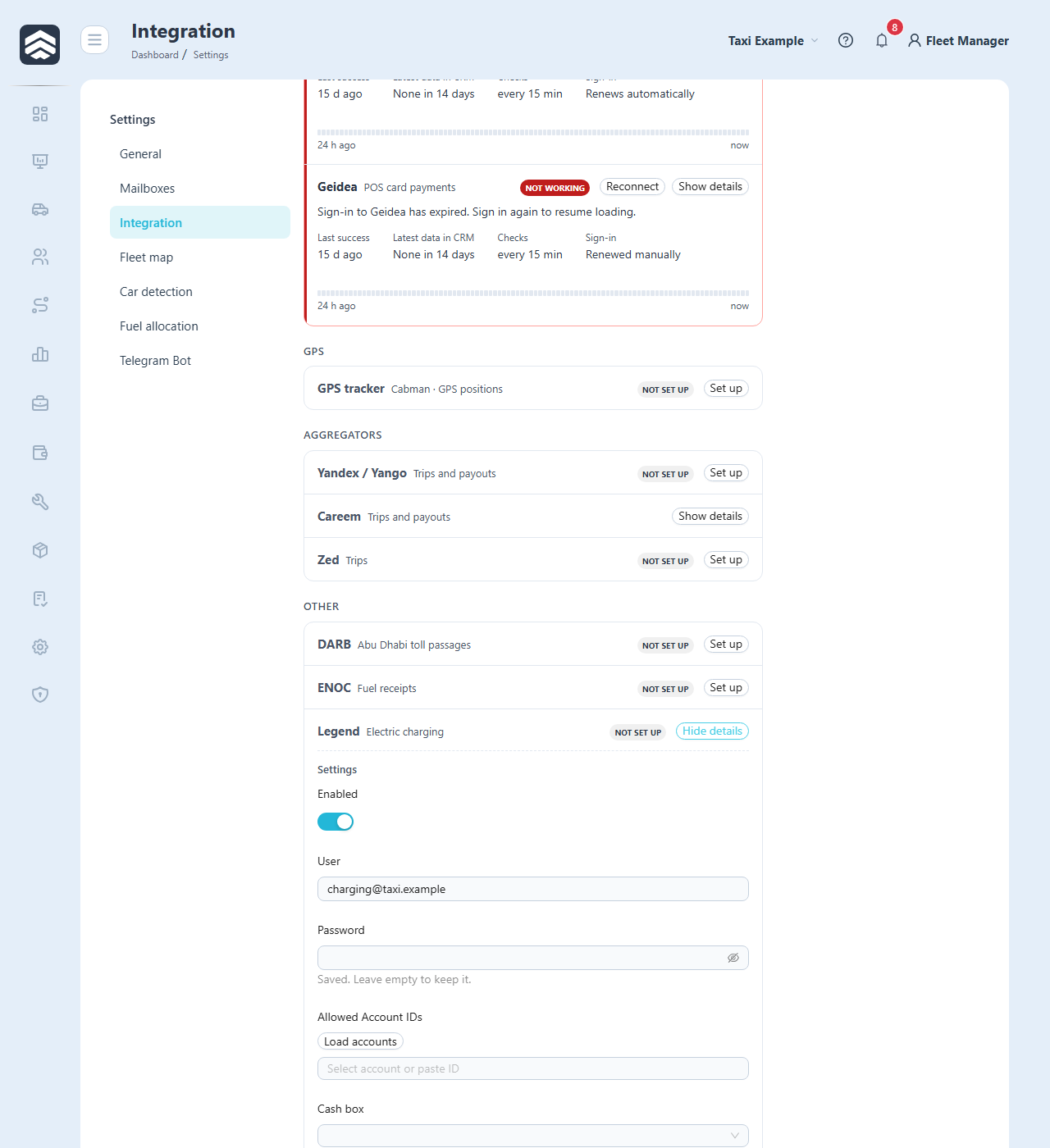
Three things to know:
- The list is the whole charging platform, not only yours — it can show other companies' accounts. Choose the one whose contact email matches your cabinet login.
- If your account is not in the list (a personal, non-company account), you can still paste its ID by hand into the same field.
- An empty field does not mean "mine" — it means "import everything", so always select your own account. Legend without a chosen account cannot be connected at all.
¶ Cabinet logins and one-time passwords
The cabinet logins are the company's own — the same user and password a person types on the provider's site. We do not issue them; ask whoever owns the account at ENOC, Legend, ChargeGo or RTA.
ENOC and RTA also ask for a one-time password at sign-in. It is read from a mailbox assigned in Settings → Mailboxes; the settings only show which one is in use, or Not assigned. The Configure link next to it appears if you may manage mailboxes.
¶ Reconnect (Geidea)
Geidea and DARB are the only two reconnected by handing the CRM a token out of the provider's portal. On the ENOC, Legend and ChargeGo cabinets Reconnect opens the sign-in wizard instead (see below). Every other connection is fixed in its own settings. For WhatsApp the session is restored by scanning the QR code in the provider's own cabinet, not by pasting anything into the CRM.
When Geidea shows Needs sign-in, press Reconnect and follow the three steps in the window:
- Open the Geidea merchant portal in a new tab and sign in (the portal asks for a captcha, so this step is always done by a person).
- Press F12, open Application → Local Storage → the portal address and copy the value of REFRESH_TOKEN.
- Paste it into the window and press Connect. Then close the portal tab without signing out — signing out revokes the sign-in you have just handed over.
From then on the CRM renews the sign-in by itself every 10 minutes, and the row turns green within a minute. The token goes straight to the connection service: the CRM does not store or show it.
¶ Reconnect (DARB)
DARB is reconnected the same way, with two differences. In step 2 copy two values from Local Storage of darb.qmobility.ae: USER_TOKEN and REFRESH_TOKEN — DARB renews the sign-in only together with the current access token. Before reconnecting, fill in the cabinet login in the DARB row's settings: without it the window refuses the tokens.
DARB toll passages appear rarely — a few a week — so an empty Latest data in CRM is normal; judge by Last success. Passages are checked every hour, and once a day the CRM looks 180 days back: a passage is published by DARB only when it is paid from the wallet, sometimes months later.
¶ Connect and load (ENOC)
ENOC (fuel receipts) is connected with Connect on its row, not with a token like Geidea or DARB. The read-only service keeps the cabinet session and pulls the receipts; the wizard hands it the login and tells it what to do.
Press Connect on the ENOC row and follow the wizard:
- Sign in. Enter the cabinet login and password, and choose how the code from ENOC is entered:
- Enter the code myself — ENOC emails a one-time code and you type it on the next step. The password is used only for this sign-in and is not stored anywhere.
- From the mailbox — the CRM reads the code itself from the mailbox assigned to this cabinet and signs in without you. This needs a green otp.enoc mailbox on the Mailboxes screen (Settings → Mailboxes); the cabinet password is then kept, encrypted, by the service so it can sign in again on its own. The option is available only once that mailbox is set up.
- The code. Enter the six digits from the letter. Resend opens after a minute. Three wrong codes close the request — start again from step 1 (ENOC treats more as guessing).
A freshly connected cabinet starts in Checking only (shadow): every poll compares the cabinet's receipts against what is already in the CRM and writes nothing, so you can confirm the match before trusting it. Start loading turns it live — from the next poll the receipts are written into the CRM as fuel deductions. Checking only switches it back; Disconnect makes the service forget the session and the stored password, and loading stops.
Once connected the CRM keeps the session alive by itself (it renews every 15 minutes); the mailbox method also signs in again on its own, at most once a day, if the session is ever lost. When a manual-code session finally expires and cannot be renewed, the row turns Needs sign-in — press Reconnect and sign in again.
A connected cabinet always offers Reconnect: the same wizard, and the mode (Checking only or loading) stays as it was — there is no need to Disconnect first.
When the ENOC password changes, press Reconnect and go through the wizard with the new password: that is what updates the password the service keeps for the mailbox method.
¶ Connect and load (Legend, ChargeGo)
Legend and ChargeGo (electric charging) are connected the same way, only shorter: these cabinets send no code, so the wizard has one step. Before connecting, choose the charging accounts and the cash box in the row's settings — Legend lists sessions of every fleet on the platform, and without a chosen account the CRM refuses to connect it.
Press Connect on the Legend or ChargeGo row, enter the cabinet login and password and press Continue. The service checks the sign-in at once and keeps the password encrypted: these cabinets have no session to renew, so it signs in again by itself whenever the old session ends (about once a day). The row starts in Checking only, as ENOC does; Start loading writes the charging sessions into the CRM, and the nightly automation stops loading this cabinet from that moment.
The service polls every six hours and reads the last seven days, so a late session still arrives. The first check does not wait for that timer: it starts right after Connect and again after Start loading or Checking only (the same holds for ENOC). A week without charging is a normal empty run, not a failure. Sessions with a zero amount are not loaded, and a session someone cancelled in the CRM is not brought back. The driver is found by the card holder's name or tag, the car — by the driver: a session whose holder matches no driver arrives without a driver and goes to the review queue.
The password in the row's settings is a separate copy: the service uses the one given in the wizard. After changing a cabinet password, connect the cabinet again with Reconnect. If the cabinet rejects the stored password, the service forgets it and does not try again — the row turns Needs sign-in.
¶ Notifications
When a connection turns Needs sign-in, Out of quota or Not working, everyone who may change company settings gets a notification in the bell — once, not every minute. A second notification arrives when it works again. Intermittent does not notify.
¶ All companies
Platform administrators see a switch This company / All companies in the header. All companies is one table of every company and its connections, worst first — the quickest way to see where something is broken right now.
⚠️ The summary does not see "runs fine, but no new data". It computes a state without the data-freshness check — that would be a query per company per connection — so a stream this company's own page shows as Intermittent stands green in the summary. Use the summary to find red and orange; to ask "is the stream empty?", open the company's own page. Notifications are not affected: they are computed with freshness, so a dead stream never produces a "working again" message.
¶ Who sees it
Everyone who may read company settings sees the page, with the states and the settings — read-only. Saving, Connect, Reconnect and switching a cabinet's mode need the right to change company settings. The page refreshes the states every minute while it is open, and at once when a state changes; the settings are not reloaded under your hands.
Settings belong to the company: changing them in one does not touch another, even for the same person switching between companies.