¶ Cashboxes
Open in CRM: /finance/cashbox
Finance → Cashbox (/finance/cashbox) is where company money is kept track of: how much is in cash, how much is on bank accounts and terminals, and how it moves between them.
A cashbox is an account, not a wallet in someone's pocket: every transaction in the system is booked against one, and the balance you see here is the sum of everything booked against it plus its start balance.
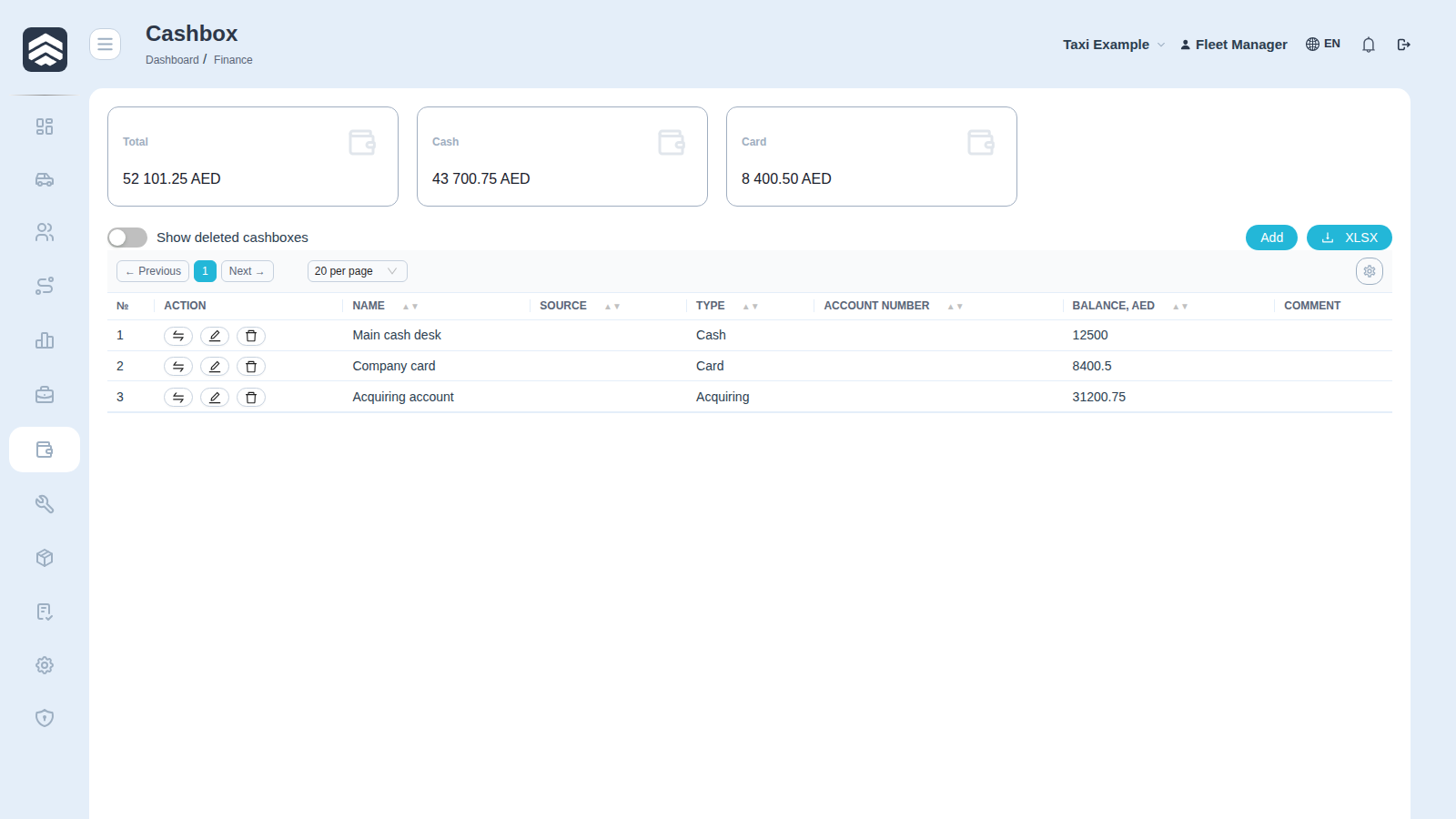
¶ Main screen
¶ Widgets
Three totals are shown above the table. A widget is hidden when its total is zero — an empty company shows no widgets at all, which is expected and not a fault.
| Widget | What it sums |
|---|---|
| Total | All cashboxes |
| Cash | Cashboxes of type Cash |
| Card | Cashboxes of type Card |
¶ Table
| Column | Description |
|---|---|
| № | Row number |
| Action | Buttons available for the row — see Operations below |
| Name | Cashbox name |
| Source | Integration that owns the cashbox (an aggregator, a terminal). Empty for cashboxes created by hand |
| Type | Cash, Card or Acquiring |
| Account Number | Account or card number |
| Balance, AED | Current balance |
| Comment | Free-text note |
Above the table: the Show deleted cashboxes toggle (deleted rows stay in the system and can be inspected, they are only hidden), the Add button and XLSX export. The gear on the right opens the column picker — hidden and reordered columns are remembered per user.
¶ Cashbox types
| Type | Purpose |
|---|---|
| Cash | Physical money — the desk, the safe, a driver's float |
| Card | A bank account: aggregator payouts, transfers, salaries |
| Acquiring | A payment terminal that accepts cards in the vehicle |
The type is not cosmetic: the Cash and Card widgets are built from it, and reports group money the same way.
¶ Creating a cashbox
Add opens a form with five fields:
| Field | Notes |
|---|---|
| Name | Up to 50 characters. Read-only for cashboxes that belong to an integration |
| Type | Cash, Card or Acquiring |
| Account Number | Account or card number, up to 50 characters |
| Start Balance | The amount already in the cashbox when you start using the system. It is added to the balance, not booked as a transaction |
| Comment | Free text |
Get the start balance right the first time: everything after it is arithmetic on top of that number, so a wrong start balance quietly shifts every later reconciliation.
¶ Operations
The first button in a row opens the money dialog with two options:
- Cashbox Income — record money coming in.
- Transfer of funds — move money between two cashboxes. One operation, two sides: the source loses and the target gains, so balances stay consistent.
Use a transfer rather than an income plus an expense — a transfer keeps both sides tied together, a pair of independent operations does not, and reconciliation is where that difference shows up.
¶ Who sees what
The screen changes with the rights of the person looking at it, which is why two people can describe the same page differently:
| Action | Required right |
|---|---|
| Open the section | CASHBOXES_READ |
| Add button | CASHBOXES_ADD |
| Edit (pencil) | CASHBOXES_CHANGE |
| Delete (bin) | CASHBOXES_DELETE |
| Income and transfer | TRANSACTIONS_ADD |
Two more restrictions apply regardless of rights:
- A cashbox that belongs to an integration (has a Source) cannot be deleted, and its name cannot be edited — the integration owns it and would recreate it anyway.
- An already deleted cashbox cannot be deleted or used for operations again.
¶ Related pages
Finance · Transactions · Auto withdrawal · Payment calendar · Taxi